Fleet Capacity Data: The Missing Link Between Route Optimization and Dispatch
Route optimization can only create practical plans when it understands what each vehicle can carry. Accurate item, weight and volume capacity data connects route planning with real dispatch decisions.
 Mohammad AlavitabarCEO @ Rouptimize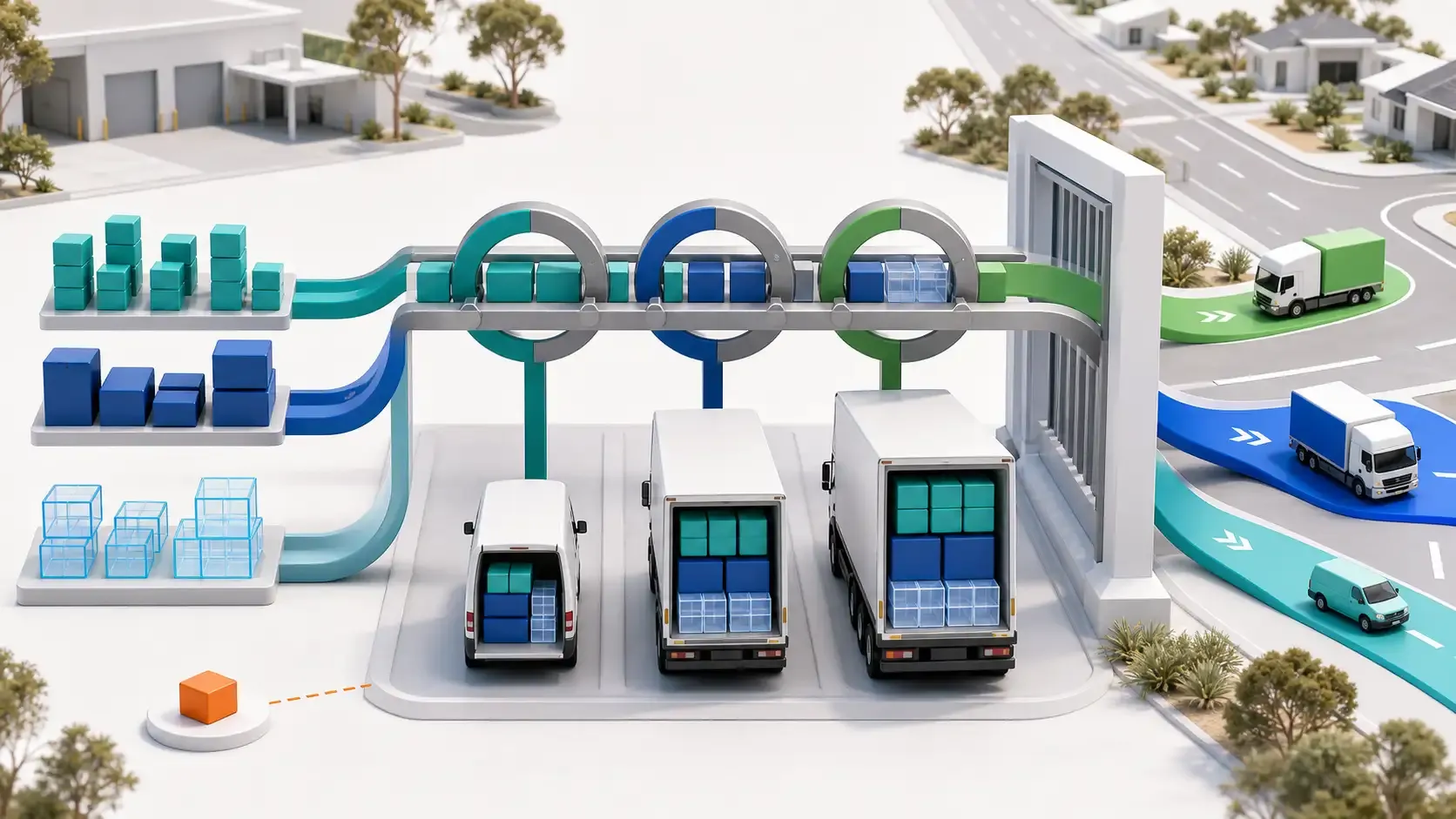
On this page
The Missing Link Between Route Optimization and Dispatch
A delivery operation can have enough capacity across its entire fleet and still be unable to dispatch a practical route plan.
The reason is simple: total fleet capacity does not complete deliveries. Individual vehicles do.
Each route must fit the capacity, availability and operating characteristics of the vehicle assigned to it. If route optimization cannot see those details, it may create a plan that looks efficient on a map but requires immediate repair at the depot.
Accurate fleet capacity data connects the mathematical route plan with the physical work of loading vehicles and sending drivers into the field.
For Australian delivery teams managing mixed vans, trucks, depots and service areas, that connection can influence vehicle requirements, driver workload, departure time and delivery cost.
What Is Fleet Capacity Data?
Fleet capacity data describes how much delivery work each vehicle can carry.
Depending on the operation, capacity may be measured through:
- Item or unit count
- Weight
- Volume
- Pallet, cage or container positions
- Vehicle-specific operating characteristics
- Required equipment or skills
A route may satisfy one capacity dimension while failing another.
For example, a vehicle may remain below its maximum weight but run out of physical cargo space. Another route may contain only a few items, but their combined weight could exceed the suitable vehicle limit.
This is why fleet management data must remain connected to mission records and route planning.
Capacity Is the Link Between Demand and Resources
Delivery missions create demand. Vehicles provide the resources needed to serve that demand.
Route optimization connects them.
Planning layer | Capacity-related question |
|---|---|
Mission data | How many items, how much weight and how much volume must move? |
Fleet data | What can each available vehicle carry? |
Route optimization | Which missions can travel together in the same vehicle? |
Dispatcher review | Is the proposed load operationally practical? |
Driver assignment | Which driver and vehicle will execute the route? |
Reporting | Did the planned capacity and workload reflect the completed operation? |
Without capacity data, route planning can group nearby stops but cannot reliably determine whether the grouped work fits the selected vehicle.
What Real Fleet Data Shows
An anonymized historical operational dataset provides a useful example of why capacity cannot be treated as one fleet-wide number.
Operational measure | Recorded value |
|---|---|
Customer records | 3,931 |
Available vehicles | 55 |
Total listed fleet capacity | 46.6 tonnes |
Approximate average listed capacity | 847 kg |
Smallest listed vehicle capacity | 600 kg |
Largest listed vehicle capacity | 6,000 kg |
Daily invoice volume across reviewed dates | 1,418–1,439 |
Reported missions per vehicle | 28–32 |
Reported capacity utilization | 88%–99% |
The largest listed vehicle could carry ten times the weight of the smallest vehicle.
That difference means the 55 vehicles could not be treated as interchangeable resources. A route feasible for one truck might be impossible for several smaller vans, even if those vans were geographically closer to the assigned customers.
*Benchmark note: These values come from anonymized historical operational data. They are not an Australian customer case study, audited cost-saving result or recommended utilization target. Australian outcomes will vary according to fleet mix, delivery density, geography, operating rules and data quality.*
Why Total Fleet Capacity Can Be Misleading
The dataset contained 46.6 tonnes of total listed capacity.
That does not mean a dispatcher could allocate any combination of 46.6 tonnes across the day.
Capacity is divided between individual vehicles. Each vehicle may also have different:
- Working hours
- Depot or branch assignments
- Active or maintenance status
- Driver availability
- Required skills
- Site suitability
- Operating costs
- Existing route assignments
A 6,000 kg truck cannot lend part of its unused capacity to a 600 kg van already assigned to another route.
Total capacity is useful for high-level planning. Route feasibility depends on capacity at the individual vehicle and route level.
Average Capacity Hides Fleet Variation
The approximate average capacity in the benchmark fleet was 847 kg.
Planning every route as though an 847 kg vehicle were available would misrepresent the real fleet.
The average does not reveal:
- How many vehicles are close to 600 kg
- How much of the total capacity belongs to the largest truck
- Which vehicles are available on a particular day
- Whether large vehicles can serve every customer location
- Which drivers can operate particular vehicles
- How capacity is distributed between depots
Averages help managers describe a fleet, but route optimization requires the actual record for each selected vehicle.
Three Capacity Dimensions Matter
Rouptimize can keep item count, weight and volume close to both mission and vehicle records.
These dimensions solve different planning problems.
Item capacity
Item count can be useful where units are reasonably consistent and the operation limits how many parcels, containers or orders a vehicle should carry.
However, 50 small parcels and 50 large cartons do not consume the same space. Item count alone may be insufficient for mixed goods.
Weight capacity
Weight helps prevent a route from receiving more load than the selected vehicle can operationally carry.
Weight data needs consistent units. Mixing kilograms and tonnes or storing gross and net values inconsistently can make a plan unreliable.
Volume capacity
Volume becomes important when goods occupy significant space before reaching the vehicle’s weight limit.
A route containing lightweight but bulky products may fail by volume even when its total weight appears acceptable.
Using several capacity dimensions creates a more realistic representation of the load.
Route Optimization Needs Capacity on Both Sides
The optimizer needs demand values from missions and limit values from vehicles.
Mission requirement | Matching vehicle data |
|---|---|
Item quantity | Maximum item capacity |
Delivery weight | Vehicle weight capacity |
Delivery volume | Vehicle volume capacity |
Required skill or equipment | Vehicle or driver skill |
Delivery time window | Vehicle and driver working window |
Branch or depot | Vehicle operating context |
If mission weight is recorded but vehicle weight capacity is missing, the constraint cannot be evaluated.
If vehicle volume is recorded but mission volume is blank, the optimizer cannot determine how much space the assigned work consumes.
A complete constraint requires accurate data on both sides.
Rouptimize’s mission management workflow keeps delivery requirements attached to the work being planned.
Capacity Errors Appear Late and Cost More
Poor capacity data often remains hidden until loading begins.
At that point, the delivery team has fewer options and less time.
Capacity-data problem | Possible dispatch consequence |
|---|---|
Vehicle capacity is overstated | The route does not fit during loading |
Mission quantity is understated | Additional goods appear after planning |
Weight and volume units are inconsistent | The optimizer compares incompatible values |
An unavailable vehicle remains active | Routes are planned around capacity that cannot be used |
The wrong vehicle is assigned | The route requires a last-minute swap |
No operating buffer is allowed | Minor order changes make the load infeasible |
Capacity data is missing | Dispatchers calculate loads manually |
Late changes can affect more than one route. Moving work from an overloaded vehicle may change stop order, route duration, driver assignments and customer time windows across the plan.
Accurate capacity information brings those decisions forward, when dispatchers still have time to review alternatives.
High Utilization Is Not Automatically Better
The benchmark reported capacity utilization between 88% and 99% across reviewed planning periods.
A high percentage can indicate that available vehicle capacity is being used effectively. It can also leave limited flexibility for:
- Late order changes
- Measurement errors
- Additional pickups
- Packaging variation
- Reassigned missions
- Operational safety margins
The correct utilization target depends on the operation and how capacity is defined.
A 99% plan should not be celebrated automatically if drivers regularly discover that goods do not fit. Equally, low utilization is not always wasteful if the route requires a specialized vehicle or serves a low-density regional area.
Capacity utilization must be reviewed with route completion, cost and service performance.
The Shortest Route May Use the Wrong Vehicle
A distance-focused plan may assign nearby missions to one vehicle because the locations form a compact route.
If the combined load exceeds that vehicle’s capacity, the operation must either:
- Use a larger vehicle
- Split the route
- Move missions to another driver
- Complete an additional trip
- Leave work unassigned
- Reschedule deliveries
Each response changes the original cost and service assumptions.
This is one reason the shortest route can still be the wrong route for a fleet. Route distance should be evaluated alongside capacity, time and completion feasibility.
Capacity Affects Daily Vehicle Requirements
Managers often ask whether route optimization can reduce the number of vehicles used each day.
Capacity data is central to the answer.
If missions are distributed poorly, the operation may use additional vehicles while capacity remains available elsewhere in the fleet. Better allocation may allow work to be consolidated into fewer feasible routes.
But using fewer vehicles is not always the correct decision.
A smaller vehicle count may create:
- Higher route workloads
- Longer driver hours
- Less capacity buffer
- Increased risk from delays
- Routes that exceed customer windows
- Greater dependence on large vehicles
The goal should be the appropriate number of vehicles for the day’s work, not the lowest number under every condition.
Dispatchers Need to See Capacity Exceptions
Optimization should make infeasible work visible rather than forcing every mission into a route.
An unassigned mission can signal that:
- Available vehicles lack sufficient capacity
- A required vehicle is inactive
- Working windows are too restrictive
- Delivery demand exceeds the selected fleet
- Mission data contains an error
- Another operational constraint prevents assignment
On the Rouptimize dispatcher map, operators can review planned routes, missions, stop order, distance, duration, ETAs and assignments before dispatch.
Capacity should be part of that review.
A dispatcher may decide to activate another vehicle, change an assignment, split work differently or correct a mission quantity. The software provides the structured result; the dispatcher decides how the operation should respond.
Capacity and Working Time Must Be Reviewed Together
A vehicle can have enough physical capacity while lacking enough operating time.
Loading more missions into a larger vehicle may reduce the number of routes, but the driver may not be able to complete all stops within the available working window.
Similarly, using several small vehicles may increase vehicle requirements while reducing individual route duration.
Capacity planning therefore needs to be reviewed with:
- Total route hours
- Stop service duration
- Driver availability
- Customer time windows
- Distance
- Route workload
- Depot return requirements
A practical route fits both the vehicle and the delivery day.
Capacity Data Supports Better Driver Handoffs
Once a route has been reviewed, the correct driver and vehicle need to be assigned.
A connected workflow ensures that the vehicle selected during planning remains associated with the route sent to the field.
The driver mobile app can then provide the assigned route and mission context needed during execution.
This reduces the risk of a driver receiving a route that was planned for a different vehicle type or capacity.
If an assignment changes, dispatchers should recheck the route against the replacement vehicle rather than assuming every available vehicle can perform the same work.
How Capacity Data Influences Delivery Cost
Accurate capacity planning can affect several cost drivers.
Vehicle use
Better workload allocation may reduce unnecessary overflow vehicles or contractor capacity.
Distance
Avoiding overloaded routes can reduce depot returns, second trips and late route splitting.
Labour
Fewer loading corrections and reassignments can reduce departure delays and planning effort.
Administration
Structured item, weight and volume data reduces repeated manual calculations.
Failed deliveries
A suitable vehicle and feasible load can reduce capacity-related incomplete work.
Fleet investment
Historical utilization data can help managers evaluate whether capacity shortages are persistent or created by planning and allocation problems.
These effects should be measured against the operation’s baseline. Fleet capacity software does not guarantee a fixed percentage saving.
Building Reliable Fleet Capacity Data
A practical capacity-data process can include:
- Decide which dimensions matter: count, weight, volume or a combination.
- Use consistent units across vehicles and missions.
- Record usable operational capacity rather than an unclear theoretical figure.
- Keep active, inactive and maintenance statuses current.
- Review capacity when vehicles or loading configurations change.
- Validate unusual mission quantities before route generation.
- Confirm that large vehicles are suitable for their assigned locations.
- Keep driver, vehicle and depot assignments current.
- Review unassigned work before dispatch.
- Compare planned capacity with completed operations.
- Correct recurring differences at the source.
This process turns capacity from a static vehicle field into a planning control.
Metrics Australian Fleet Managers Should Review
Useful capacity and route measures include:
- Missions per vehicle
- Weight utilization by route
- Volume utilization by route
- Item utilization by route
- Unassigned missions caused by capacity
- Last-minute vehicle changes
- Additional depot trips
- Contractor or overflow vehicles used
- Planned versus completed route workload
- Cost per completed delivery
- Failed or rescheduled missions
- Capacity-data corrections
Rouptimize’s reports and analytics help keep fleet, route, mission and driver results connected to the planning workflow.
The reporting process should lead back to better data. If one vehicle regularly appears full in the system but leaves with unused space, its recorded capacity or mission-volume data may need review.
Capacity Data Preserves Operational Knowledge
Experienced dispatchers often know vehicle capacity through daily practice.
They remember which products fit in which van, which vehicle works for a difficult location and how much buffer is needed for a particular route.
That knowledge is valuable, but it becomes fragile when it exists only in one person’s memory.
Structured fleet capacity data allows the operation to preserve repeatable rules and apply them more consistently. It reduces dependence on one routing expert while keeping dispatcher judgement available for unusual situations.
This is part of the broader journey from vehicle records to driver-ready routes.
Make Capacity Part of Every Route Decision
Fleet capacity should not remain a reference field that dispatchers check after routes have already been created.
It should influence which missions travel together, which vehicle receives each route and which exceptions need attention before departure.
When item, weight and volume requirements remain connected to vehicles, routes and assignments, Australian delivery teams can create plans that are easier to load, review and dispatch.
Start free with Rouptimize and bring fleet capacity into your route-planning workflow.
Written by
Results-oriented and visionary CEO with a passion for innovation and a track record of transforming startups into industry leaders. Seeking a leadership role in a dynamic startup environment where I can leverage my strategic acumen, entrepreneurial spirit, and hands-on experience to drive growth, build high-performing teams, and deliver unparalleled value to customers. Committed to fostering a culture of creativity, adaptability, and sustainable success.
Operations • Management • Route Optimization • Product Management • Logistics • Problem Solving
FAQ
What fleet capacity data is needed for route optimization?
Useful data can include item, weight and volume limits for each vehicle, together with availability, working hours, skills, costs and depot context.
Is total fleet capacity enough for route planning?
No. Total capacity is divided between individual vehicles. Each route must fit the specific vehicle assigned to it.
Why should weight and volume both be recorded?
A load can remain below the weight limit while exceeding the available cargo space. Weight and volume represent different constraints.
Is maximum vehicle utilization always the goal?
No. Very high utilization may leave little flexibility for data errors, late changes, pickups or operational buffers. The appropriate target depends on the delivery operation.
Can route optimization prevent vehicle overloading?
It can apply the capacity values supplied for missions and vehicles. The result depends on accurate data and does not replace loading checks or operational responsibility.
How does capacity data affect dispatch?
It helps dispatchers identify which routes fit which vehicles, review unassigned work and avoid last-minute vehicle changes.
Can better capacity planning reduce delivery costs?
It can help control avoidable vehicle use, reloading, second trips, planning effort and failed work. Actual savings depend on the operation’s baseline and implementation.