From Vehicle Records to Driver-Ready Routes: Building One Connected Delivery Workflow
Vehicle and order records only become operationally valuable when they help create practical routes, clear assignments and driver-ready work. A connected workflow keeps that information moving from planning to delivery completion.
 Mohammad AlavitabarCEO @ Rouptimize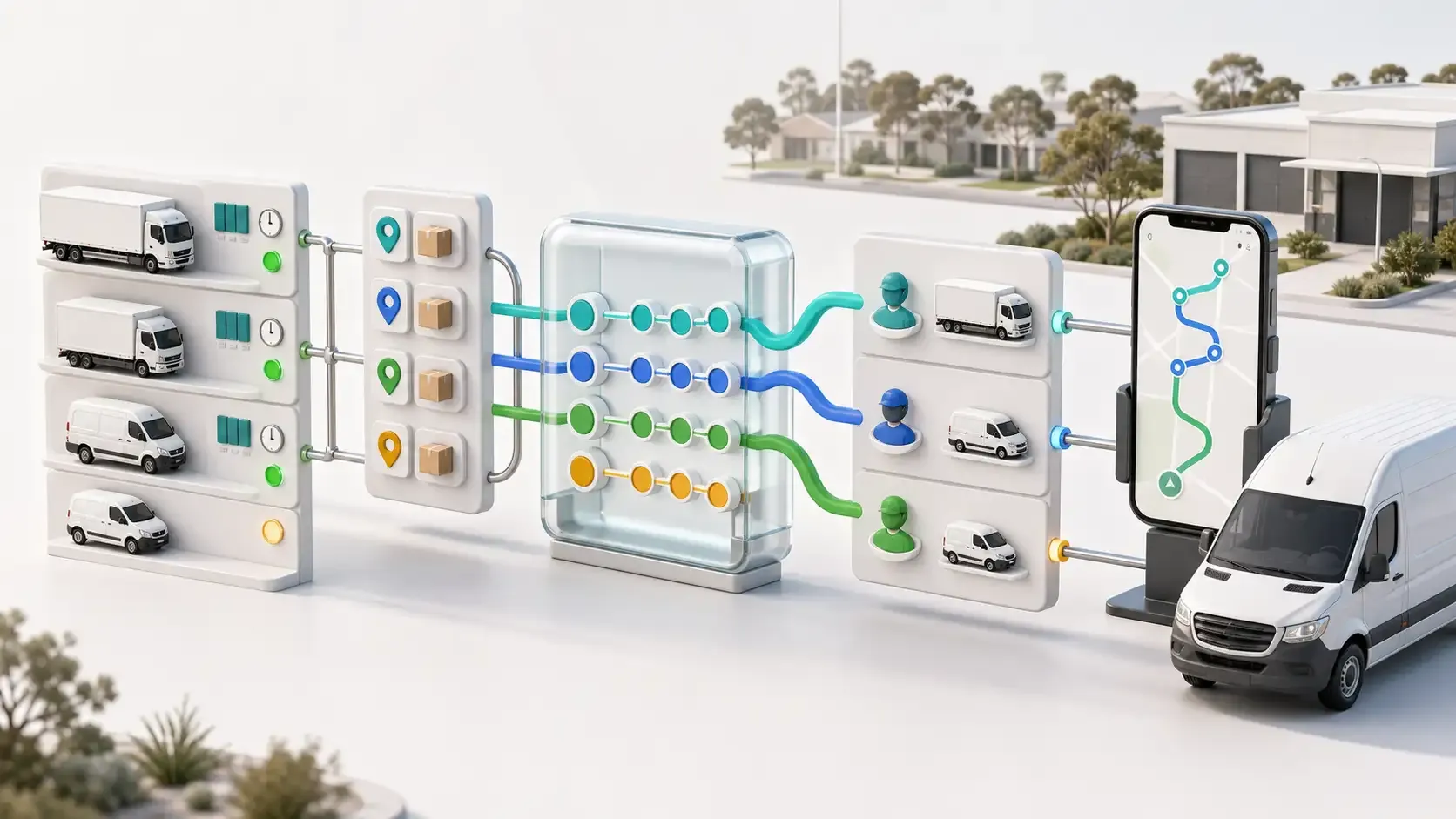
On this page
Most delivery operations already have plenty of records.
They have vehicle lists, driver details, customer addresses, order files, working hours and delivery requirements. The difficulty is turning those separate records into routes that drivers can actually complete.
A vehicle record does not improve a route by sitting in a fleet database. An optimized route does not help the operation until it has been reviewed, assigned and delivered to the correct driver.
The value appears when information moves through one connected delivery workflow: from vehicle and mission data to route optimization, dispatch, driver execution and performance reporting.
For Australian delivery teams, that connection can reduce repeated administration, expose planning problems earlier and make daily decisions less dependent on information held by one experienced dispatcher.
What Is a Driver-Ready Route?
A route is not driver-ready simply because a line has been drawn between several stops.
Before dispatch, the route should answer practical questions such as:
- Which driver will complete it?
- Which vehicle will be used?
- Can that vehicle carry the assigned work?
- Does the route fit the available working window?
- What order should the stops follow?
- What does the driver need to know about each mission?
- Are customer time windows and service durations included?
- Is any work still unassigned?
- How will completion be recorded?
A driver-ready route combines the planned sequence with the operational context needed in the field.
The Connected Delivery Workflow
A complete workflow links several related decisions.
Workflow stage | Information required | Operational output |
|---|---|---|
Fleet preparation | Active vehicles, drivers, capacities, skills, costs and working hours | Resources available for planning |
Mission preparation | Locations, quantities, time windows, service duration and priorities | Delivery work ready for allocation |
Route optimization | Missions, vehicles, depots and operating constraints | Proposed routes and unassigned exceptions |
Dispatcher review | Route geometry, duration, distance, ETAs and stop order | Approved operational plan |
Assignment | Driver, vehicle, branch and route | Clear ownership of each route |
Driver handoff | Assigned stops, route sequence and mission details | Driver-ready mobile work |
Execution monitoring | Route progress, location updates and mission status | Visible delivery exceptions |
Completion and reporting | Final status, confirmation and route results | Evidence for the next planning cycle |
If one stage is disconnected, the following stages have to compensate manually.
A dispatcher may need to check vehicle availability in another system, recalculate capacity in a spreadsheet, send route changes through messages or rebuild completed-delivery reports after the day has ended.
Vehicle Records Must Influence Route Decisions
The first requirement is an accurate view of the available fleet.
Useful vehicle and driver information can include:
- Active, inactive or maintenance status
- Weight, volume and item capacity
- Driver and vehicle assignments
- Working hours
- Branch or depot context
- Required skills or operating characteristics
- Vehicle cost information
Rouptimize’s fleet management capabilities keep these operational details close to the route-planning workflow.
The important principle is not where every company stores its complete fleet history. A separate fleet platform may remain responsible for maintenance, registration, fuel or compliance records.
Route planning needs the current operational subset: which resources can work, what they can carry, when they are available and which delivery requirements they can satisfy.
If separate systems are used, the business needs a reliable process for keeping that information consistent. A connected workflow should not be assumed to mean an automatic integration unless one has been established.
What Real Operational Data Reveals
An anonymized historical planning dataset illustrates the amount of information that may sit behind one delivery operation.
Planning measure | Recorded value | Why it matters |
|---|---|---|
Customer records | 3,931 | Provides the location and customer base for delivery planning |
Available vehicles | 55 | Defines the fleet that can participate in route allocation |
Total listed vehicle capacity | 46.6 tonnes | Establishes the combined carrying limit |
Approximate average listed capacity | 847 kg | Provides a broad fleet-level reference |
Vehicle capacity range | 600–6,000 kg | Shows why vehicles cannot be treated as interchangeable |
Daily invoice volume across reviewed dates | 1,418–1,439 | Indicates the scale of daily order processing |
Reported missions per vehicle | 28–32 | Helps managers review route workload |
Reported capacity utilization | 88%–99% | Makes planned vehicle loading visible |
*Benchmark note: These values come from anonymised historical operational data and do not represent an Australian customer implementation. Reported utilization follows the source report’s calculation. Results in Australia will depend on fleet composition, delivery density, geography, service windows and data quality.*
The most important figure is not necessarily the largest one.
The 600–6,000 kg capacity range demonstrates that assigning a route to “a vehicle” is not enough. The correct type of vehicle must be available for the specific combination of missions.
A route may be geographically efficient while being impossible for the selected vehicle to carry.
Similar-Looking Records Can Mean Different Things
Connected planning also requires clear definitions.
A customer record is not necessarily a delivery mission. One customer may receive several orders or no delivery on a particular day.
An invoice is not automatically a stop. Several invoices may travel to the same location, while one order may create linked pickup and delivery activities.
An active vehicle is not automatically a suitable vehicle. Capacity, skills, working hours and depot assignment can still exclude it from a particular route.
Total fleet capacity is not the same as usable capacity for every delivery day. The load must be distributed across individual vehicles while respecting route and time constraints.
When these definitions are mixed together, reports can look precise while describing different operational units.
Mission Data Defines the Work
Fleet records describe the available resources. Mission records describe the demand those resources must serve.
A useful mission record can contain:
- Delivery location
- Planning date
- Service duration
- Customer time window
- Item count, weight or volume
- Priority
- Required skills
- Branch or depot context
- Assigned route, driver or vehicle
- Final delivery status
Rouptimize’s delivery mission management workflow keeps these details connected to route planning and completion.
Clean mission data reduces the amount of repair required after optimization. Incomplete addresses, missing service durations or inconsistent capacity units can produce routes that look valid in software but need extensive dispatcher correction.
Route Optimization Connects Demand With Capacity
Once fleet and mission data are prepared, route optimization software can evaluate how the work should be grouped and sequenced.
The planner can consider the selected missions, active vehicles, depots, working windows, vehicle capacities, required skills and customer constraints.
The result should include more than planned routes. It should also make unassigned work visible.
An unassigned mission is useful operational information. It may indicate:
- Insufficient vehicle capacity
- An unavailable vehicle or driver
- An impossible time window
- A missing required skill
- Excessive demand for the available planning period
- Incorrect or incomplete input data
Hiding these exceptions until dispatch does not make the plan more successful. It only moves the problem closer to departure time.
Dispatch Review Turns a Plan Into an Operational Decision
An optimized plan is a proposal until someone reviews it.
On the dispatcher map, operators can examine routes, depots, missions, stop order, geometry, distance, duration, ETAs and assignments before sending work to drivers.
This is where dispatcher knowledge adds context that may not exist in the data.
The dispatcher may know that:
- A customer needs more unloading time than recorded
- A particular vehicle is unsuitable for a site
- A driver is familiar with a difficult delivery area
- A route contains too many service-intensive stops
- A late operational change affects vehicle availability
- One assignment should move to balance the day
The objective is not to remove review. It is to give the dispatcher a structured plan that is easier to evaluate and adjust.
Assignment Creates Clear Ownership
A reviewed route still needs an owner.
Assigning the correct driver and vehicle connects the route plan with the people and resources responsible for executing it. Without this step, dispatchers may have to explain ownership through calls, messages or separate spreadsheets.
A clear assignment should confirm:
- The approved route
- The assigned driver
- The assigned vehicle
- The relevant planning date and branch
- The mission sequence
- Any remaining exception that needs attention
Rouptimize keeps driver and vehicle assignment within the operational route workflow.
This reduces the risk of a good route being sent to the wrong person or matched with an unsuitable vehicle.
The Driver Handoff Should Preserve Context
Drivers need more than a list of addresses.
The Rouptimize driver mobile app keeps assigned routes, mission information, navigation, delivery status and completion actions available in the field.
A connected handoff means the driver receives the route that dispatch approved, along with the mission details needed to complete the work.
This can reduce questions such as:
- Which route am I completing today?
- Which stop comes next?
- What is being delivered?
- Is there a customer time window?
- How should completion be recorded?
- Has this mission already been completed or changed?
The clearer the handoff, the less time drivers and dispatchers need to spend reconstructing context during the delivery day.
Visibility Should Continue During Execution
Operational conditions can change after dispatch.
A driver may be delayed, a customer may require additional service time or a mission may remain incomplete. Dispatch teams need enough visibility to identify meaningful exceptions without turning monitoring into constant driver pressure.
Live delivery monitoring connects current route activity with driver, vehicle and mission context.
The aim is not to watch every movement. It is to recognize where the delivery plan is no longer unfolding as expected and decide whether support or adjustment is required.
Completion Data Closes the Workflow
A delivery workflow should finish with a clear mission result.
A lightweight proof-of-delivery confirmation can connect customer confirmation and final delivery status to the mission record.
That information becomes useful for:
- Resolving delivery questions
- Distinguishing completed and unsuccessful work
- Identifying repeat-delivery requirements
- Comparing planned and completed missions
- Reviewing route and driver performance
- Improving future planning data
Without connected completion data, managers may know that a route was dispatched but not whether every mission produced the expected outcome.
How Disconnected Handoffs Increase Delivery Cost
The cost of a disconnected workflow is not limited to additional kilometres.
Disconnected handoff | Possible operational effect |
|---|---|
Fleet status does not reach planning | Routes are created for unavailable vehicles |
Capacity data is missing | Loads require late reassignment or an additional vehicle |
Mission details are incomplete | Drivers contact dispatch for missing context |
Route review occurs in another tool | Stop changes and assignments must be rebuilt |
Driver handoff uses messages or paper | Route ownership and updates become harder to control |
Completion status is separated | Reports require manual reconciliation |
Reports do not influence setup | The same planning problems repeat |
These failures can increase administrative effort, departure delays, vehicle use, overtime exposure and redelivery work.
A connected workflow does not guarantee a fixed cost reduction. It gives the operation better control over the decisions that create cost.
Customer Experience Begins With Operational Data
Customers do not see vehicle records or route constraints. They experience the result of those decisions.
When mission details, vehicle suitability, route sequence and driver assignments remain connected, the operation has a stronger foundation for:
- Meeting delivery commitments
- Reducing preventable assignment problems
- Giving drivers clearer customer context
- Identifying exceptions earlier
- Maintaining more reliable completion records
Better operational reliability may also reduce complaints, redelivery pressure and customer-service workload.
Any effect on retention, sales effort or marketing cost should be measured separately. Route reports alone cannot prove those commercial outcomes, but they can provide the operational evidence needed to investigate them.
A Practical Daily Workflow
Australian delivery teams can build a repeatable process around these steps:
- Update active vehicles, capacities, working hours, skills and driver availability.
- Import or create missions with accurate addresses, quantities, time windows and service durations.
- Confirm the relevant branch, depots and planning date.
- Select the missions and vehicles available for routing.
- Generate routes using the recorded operational constraints.
- Review route workload, ETAs, stop order and unassigned work.
- Adjust the plan where dispatcher knowledge adds important context.
- Assign the correct driver and vehicle.
- Send the approved routes to the driver workflow.
- Monitor exceptions during delivery execution.
- Record completion and proof against the mission.
- Review route, mission, driver and fleet results.
- Correct the underlying data before the next planning cycle.
This is the difference between using software for one calculation and building a connected delivery operation.
Metrics That Reveal Workflow Quality
Managers can evaluate the workflow using measures such as:
- Planning time
- Manual route changes
- Late driver or vehicle reassignments
- Unassigned missions
- Departure delays
- Missions per vehicle
- Capacity utilization
- Planned versus actual route duration
- Failed or rescheduled deliveries
- Driver calls caused by missing information
- Cost per completed delivery
Rouptimize’s reports and analytics keep route, mission, driver and fleet results close to the operational records used for planning.
The most useful report is one that leads to a decision. If route durations are repeatedly underestimated, service-time data may need revision. If loads require frequent reassignment, capacity or quantity data may be incomplete.
Connected Data Reduces Dependence on Tribal Knowledge
Experienced dispatchers often carry important information in memory.
They know which vehicle can serve a particular customer, how long a difficult stop usually takes and which driver understands a delivery area.
That experience remains valuable, but relying on one person to remember every rule creates risk as the operation grows.
A connected delivery workflow turns repeatable knowledge into structured data and visible decisions. Software can apply recorded constraints consistently, while dispatchers focus on exceptions and local judgement.
This does not eliminate the need for experienced people. It makes their knowledge easier to preserve, review and improve.
Turn Operational Records Into Executable Work
Vehicle and delivery records are valuable only when they influence real decisions.
A connected workflow keeps those decisions moving from fleet preparation and mission data through route optimization, dispatcher review, assignment, driver execution and reporting.
The result is not merely a route on a map. It is a route that has an appropriate vehicle, a responsible driver, usable mission context and a clear completion record.
Start free with Rouptimize and turn your operational records into driver-ready delivery routes.
Written by
Results-oriented and visionary CEO with a passion for innovation and a track record of transforming startups into industry leaders. Seeking a leadership role in a dynamic startup environment where I can leverage my strategic acumen, entrepreneurial spirit, and hands-on experience to drive growth, build high-performing teams, and deliver unparalleled value to customers. Committed to fostering a culture of creativity, adaptability, and sustainable success.
Operations • Management • Route Optimization • Product Management • Logistics • Problem Solving
FAQ
What makes a route driver-ready?
A driver-ready route has been reviewed, assigned to the correct driver and vehicle, checked against capacity and working constraints, and made available with the mission details required in the field.
Is fleet management the same as route optimization?
No. Fleet management defines the vehicles, drivers and operating resources available. Route optimization decides how delivery work should be allocated and sequenced across those resources.
Does a connected workflow require one software platform?
Not necessarily. Several systems can participate, but the operation needs clear data ownership and a reliable way to keep important fleet, mission, dispatch and completion information consistent.
What fleet data is most important for route planning?
Active status, vehicle capacity, working hours, skills, depot context, driver assignments and relevant cost information are particularly useful.
What mission data should be prepared before optimization?
Accurate locations, dates, quantities, service durations, time windows, priorities, required skills and pickup or delivery relationships help create more practical plans.
Can software replace dispatcher experience?
No. Software can standardize calculations and recorded constraints. Dispatchers still contribute local knowledge, assess exceptions and approve operational decisions.
How does the workflow help control delivery costs?
It can reduce repeated data entry, infeasible routes, late reassignment and hidden exceptions. Actual financial results depend on the operation’s baseline, data quality and implementation.