Route Planning From Import to Dispatch: A Practical Workflow for Delivery Teams
Route planning improves when dispatchers can move from imported delivery work to optimized routes without rebuilding the same plan in separate tools.
On this page
Route planning becomes difficult when delivery work is spread across too many tools.
One file holds the customer orders. Another system stores driver and vehicle details. A dispatcher uses a spreadsheet to clean the data. A separate map is used to check locations. Then routes are rebuilt again before drivers receive their assigned work.
This creates delay, duplication, and mistakes.
For Australian courier, ecommerce, grocery, field service, and last-mile delivery teams, the practical goal is simple: move from imported delivery work to reviewed, dispatch-ready routes without rebuilding the same plan in separate tools.
That is where connected route planning matters.
Why Import-to-Dispatch Planning Matters
Many delivery teams already have the work before they have the route. Orders arrive from ecommerce platforms, warehouse systems, customer service teams, spreadsheets, or internal operations tools.
The challenge is turning that imported work into routes that dispatchers can trust.
Good route planning is not only about finding the shortest path. It requires the dispatcher to understand:
- Which missions need to be completed
- Where each stop is located
- Which branch or depot owns the work
- Which vehicles have enough capacity
- Which drivers are available
- Which time windows must be respected
- Whether the route is realistic before dispatch
When these details are disconnected, dispatchers spend too much time rebuilding the plan manually. When they are connected, route planning becomes faster, clearer, and easier to review.
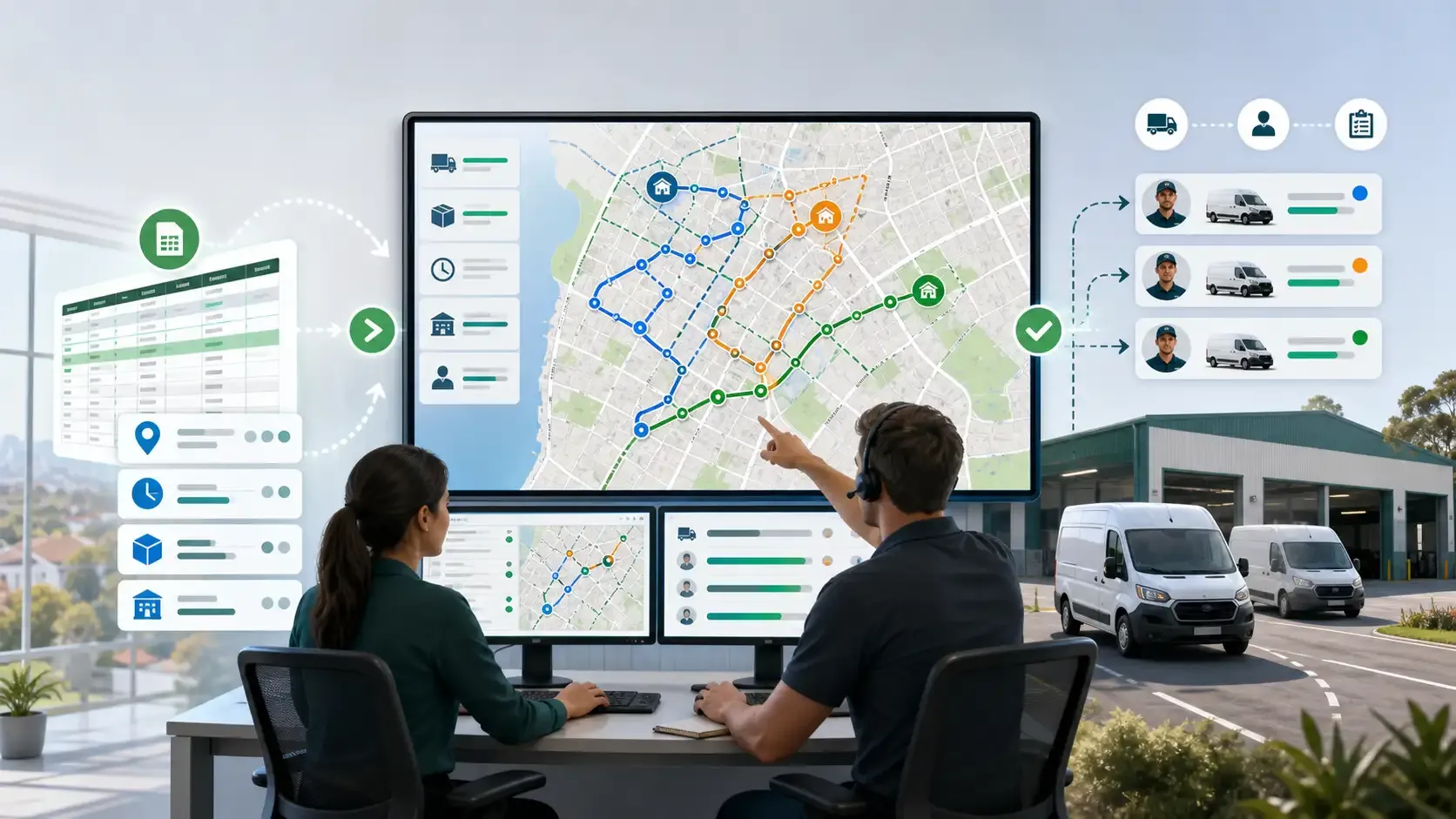
Rouptimize is built around this connected workflow, helping teams move from mission import to route optimization software, dispatcher review, driver assignment, and dispatch.
Step 1: Import Delivery Missions Cleanly
The workflow starts with mission data.
A delivery mission may include the customer name, address, coordinates, delivery date, time window, service duration, parcel details, branch, priority, and any pickup or delivery requirements.
If this data enters the system badly, the route plan will be weak from the beginning. Dispatchers may need to fix addresses, remove duplicates, correct missing fields, or manually separate work by branch.
That is why clean import matters.
Rouptimize supports teams that need to import delivery missions from CSV, XLSX, or JSON. This is useful for Australian delivery operators that still receive daily order lists from spreadsheets, ecommerce exports, warehouse tools, or customer service files.
A better import process helps dispatchers start the day with structured delivery work instead of scattered data.
Step 2: Keep Mission Details in the Planning Workflow
After missions are imported, dispatchers need to review the details that affect the route.
This includes customer locations, time windows, delivery type, branch context, stop duration, priority, and capacity requirements. If these details are hidden in another system, the dispatcher has to switch tools or make assumptions.
Those assumptions become expensive later.
A route may look efficient on a map but fail because a customer has a tight time window. A vehicle may be assigned more work than it can carry. A driver may receive stops from the wrong branch. A plan may ignore service time and become unrealistic by the afternoon.
This is why delivery mission management software should be closely connected to route planning. The mission is not just an order record. It is the foundation of the route.
Step 3: Match Routes With Vehicle Capacity
Australian delivery teams often operate mixed fleets: vans, trucks, motorcycles, utes, refrigerated vehicles, or branch-specific vehicles. Each vehicle may have different capacity, operating limits, or availability.
If vehicle capacity is not part of the route planning workflow, dispatchers may create routes that look possible on screen but fail at the loading dock.
Good route planning should consider:
- Vehicle weight capacity
- Vehicle volume capacity
- Driver and vehicle availability
- Branch or depot assignment
- Delivery type suitability
- Workload balance across the fleet
This is especially important for bulky ecommerce orders, grocery delivery, B2B supply routes, and multi-branch operations.
For a deeper planning angle, Rouptimize’s guide to vehicle capacity route planning explains why capacity data matters before routes are dispatched.
Step 4: Optimize Around Real Constraints
Once missions, locations, vehicles, time windows, and branch context are available, the dispatcher can move from raw delivery work to optimized route plans.
This is where route optimization becomes valuable.
The goal is not simply to draw nice route lines on a map. The goal is to create a route plan that reflects real delivery constraints and can actually be completed by drivers.
For Australian delivery operations, this may include dense metro runs, regional distances, depot-based planning, customer delivery windows, driver shift limits, and vehicle capacity rules.
A connected route planning workflow helps dispatchers avoid repeated manual work. They can move from imported missions to optimized routes in one operational flow, then review the result before sending it to the field.
Step 5: Review Routes Before Dispatch
Optimization should not remove dispatcher judgement.
Experienced dispatchers understand local details that may not be obvious in raw data. They may know that a customer location has difficult access, a suburb becomes slower at certain times, or one route should be adjusted before drivers leave.
That is why route review is an important step between optimization and dispatch.
A dispatcher map helps operators review missions, depots, route geometry, vehicle assignments, and stop sequence before routes are sent to drivers. This gives the dispatcher a practical control point: accept the plan, adjust it, or investigate exceptions.
The best workflow is not “software decides, people follow.” The best workflow is “software prepares the plan, dispatchers review it, and drivers receive clearer work.”
Step 6: Assign Drivers and Dispatch Routes
After routes are reviewed, the next step is assignment.
Drivers need to know which route they are responsible for, which stops they need to complete, where to go next, and what delivery details matter at each stop.
If driver assignment is handled separately from route planning, mistakes can appear at the final stage. The wrong driver may receive the wrong work. A route may be ready but not visible to the driver. Dispatchers may need to manually message instructions that should already be connected to the route.
Rouptimize connects route planning with driver assignment and the driver delivery app, helping teams move from reviewed routes to driver-ready work.
This matters because dispatch is not complete when the route is optimized. Dispatch is complete when the right driver has the right route and can start the job with clear information.
Step 7: Monitor the Plan After Dispatch
Route planning does not end when drivers leave the depot.
Once routes are active, dispatchers need visibility into what is happening in the field. Are drivers progressing as expected? Are routes falling behind? Are some stops delayed? Are exceptions appearing during the day?
This is where live delivery monitoring supports the dispatch workflow. It helps teams compare the route plan with real delivery progress while there is still time to act.
For Australian delivery teams managing busy metro routes or wide service areas, live monitoring can reduce uncertainty. Dispatchers can focus on exceptions instead of repeatedly calling drivers for updates.
Step 8: Use Reports to Improve the Next Plan
The strongest delivery teams do not treat each route plan as a one-time event. They learn from every delivery day.
After dispatch, reports help teams understand what happened:
- Which routes finished late
- Which stops caused delays
- Which drivers had overloaded schedules
- Which time windows were difficult
- Which branches had repeated exceptions
- Which planning assumptions need revision
Rouptimize’s delivery reports and analytics help teams review route performance, delivery activity, and operational outcomes.
This creates a continuous improvement loop. Import better data, plan better routes, dispatch clearer work, monitor active deliveries, review reports, and improve the next plan.
Why This Workflow Helps Australian Delivery Teams Compete
The Australian delivery market has real operational complexity. Teams may need to manage city congestion, regional distance, branch-based planning, customer time windows, driver availability, and rising delivery costs.
A disconnected planning process makes that complexity harder.
A connected import-to-dispatch workflow gives delivery operators more control. It reduces duplicate work, improves route review, supports better driver assignment, and creates cleaner data for future decisions.
That is why route planning should not be treated as a single button. It is a workflow.
The more connected the workflow becomes, the easier it is for dispatchers to make decisions and for managers to improve performance over time.
Conclusion: Better Dispatch Starts Before Dispatch
Route planning improves when dispatchers can move from imported missions to optimized routes without rebuilding the same plan in separate tools.
Rouptimize keeps mission details, vehicle capacity, time windows, branch context, and driver assignment in the same workflow so operators can review the route plan before dispatch.
For Australian delivery teams looking for practical route planning solutions, the value is not only faster optimization. The value is a clearer operating flow from import to dispatch.
Start free with Rouptimize
Written by

Results-oriented and visionary CEO with a passion for innovation and a track record of transforming startups into industry leaders. Seeking a leadership role in a dynamic startup environment where I can leverage my strategic acumen, entrepreneurial spirit, and hands-on experience to drive growth, build high-performing teams, and deliver unparalleled value to customers. Committed to fostering a culture of creativity, adaptability, and sustainable success.
Operations • Management • Route Optimization • Product Management • Logistics • Problem Solving
FAQ
What does route planning from import to dispatch mean?
It means turning imported delivery work into reviewed, assigned, dispatch-ready routes without rebuilding the same plan across multiple disconnected tools.
Why is mission import important for route planning?
Mission import is important because the quality of the route depends on the quality of the delivery data. Clean imported missions help dispatchers plan routes with accurate customer, location, time-window, branch, and capacity information.
How does route optimization help dispatch teams?
Route optimization helps dispatch teams turn delivery missions, vehicles, drivers, depots, and time windows into practical route plans. Dispatchers can then review and adjust those plans before sending them to drivers.
Should dispatchers still review optimized routes?
Yes. Dispatchers should review optimized routes before dispatch because local knowledge, operational judgement, and exception handling still matter.
What makes route planning software useful for Australian delivery teams?
Useful route planning software helps Australian teams manage delivery density, regional distance, branch context, driver availability, vehicle capacity, and customer time windows in one workflow.
How does live monitoring support dispatch?
Live monitoring helps dispatchers see whether active routes are progressing as expected. This makes it easier to identify delays, exceptions, and routes that need attention during the delivery day.
How can reports improve future route plans?
Reports help teams compare planned routes with actual delivery outcomes. This helps managers improve assumptions, fix repeated issues, and make better planning decisions over time.